

How to build a business
case for Permit to Work software

Man Walking Along Rooftop
Back to all
Guide
December 11, 2025

Well-known challenges

For those involved in industries with high to moderate risk activities, the need for permits is a given. Whether hot work permits for welding or entry permits for a confined space, a single job site can require multiple running simultaneously.

Permit to work systems are typically time based and rely on the establishment of safe conditions for the work to commence and the maintenance of safe conditions for the duration of the work.

Managing the extensive list of documents that go into creating a permit (RAMS, JHA’s, training records, plant records etc.) is a common challenge for Operations Managers, especially when they have to be sourced from external contractors. The fact that many of these documents are only to be found in hard copy further compounds this problem.

Of course, work is not always concluded during the set time frame of its permit. Extensions are required and shift handovers can occur, requiring a new expiry time to be issued. With traditional, paper-based PTW systems this means more time spent, more admin work, and increasingly siloed information. As the process drags on, this can lead to unapproved work and missed safety checks.

Most importantly, workers are exposed to high levels of risk without proper controls in place. However, it also means that projects are delayed with associated costs spiralling.

Getting what you need

Operations Managers, H&S Managers, Site Managers, and Project Managers are aware of all this. The benefits of a digital solution for permit to work are well-known, principally 1) controlling real-time risks and 2) improving the speed at which safe work is completed.

Communicating this value to senior management and those who hold the purse strings is another matter. Budgets are tight and software can be seen as a ‘nice to have’ rather than a necessity. You need to be able to show the potential ROI of software investment in a way your intended audience will understand and respond to.

This guide is here to help you. We will cover a wide range of topics including how to show ROI, communicating your business case to senior management, and a step-by-step breakdown of what it needs to cover. We’ll also take a look at some success stories that you can use to bolster your pitch.

Let’s get started.

Firstly, why do I need a business case?

A detailed business case shows that you have considered your software project from multiple angles. It lets you show that your project aligns with business objectives (e.g. increased efficiency), that it is commercially viable in the long term (e.g. showing ROI), and that you have assessed a range of possible solutions.

Crucially, a good business case will also cover:

  • implementation 
  • necessary resources
  • project milestones and timelines 
  • stakeholder communication strategy 
  • an honest appraisal of costs and possible risks

Your business case will show that you have considered all of these aspects and have spent the time gathering supporting information.

It will help you to show that an investment in Permit to Work software is not just a business cost. As part of an integrated safe system of work, it can help to ensure hazards are managed, risks are minimised, and work is carried out as safely and efficiently as possible.

Want to see how all the different solutions stack up?

Making your case for change – the hidden costs of manual permits

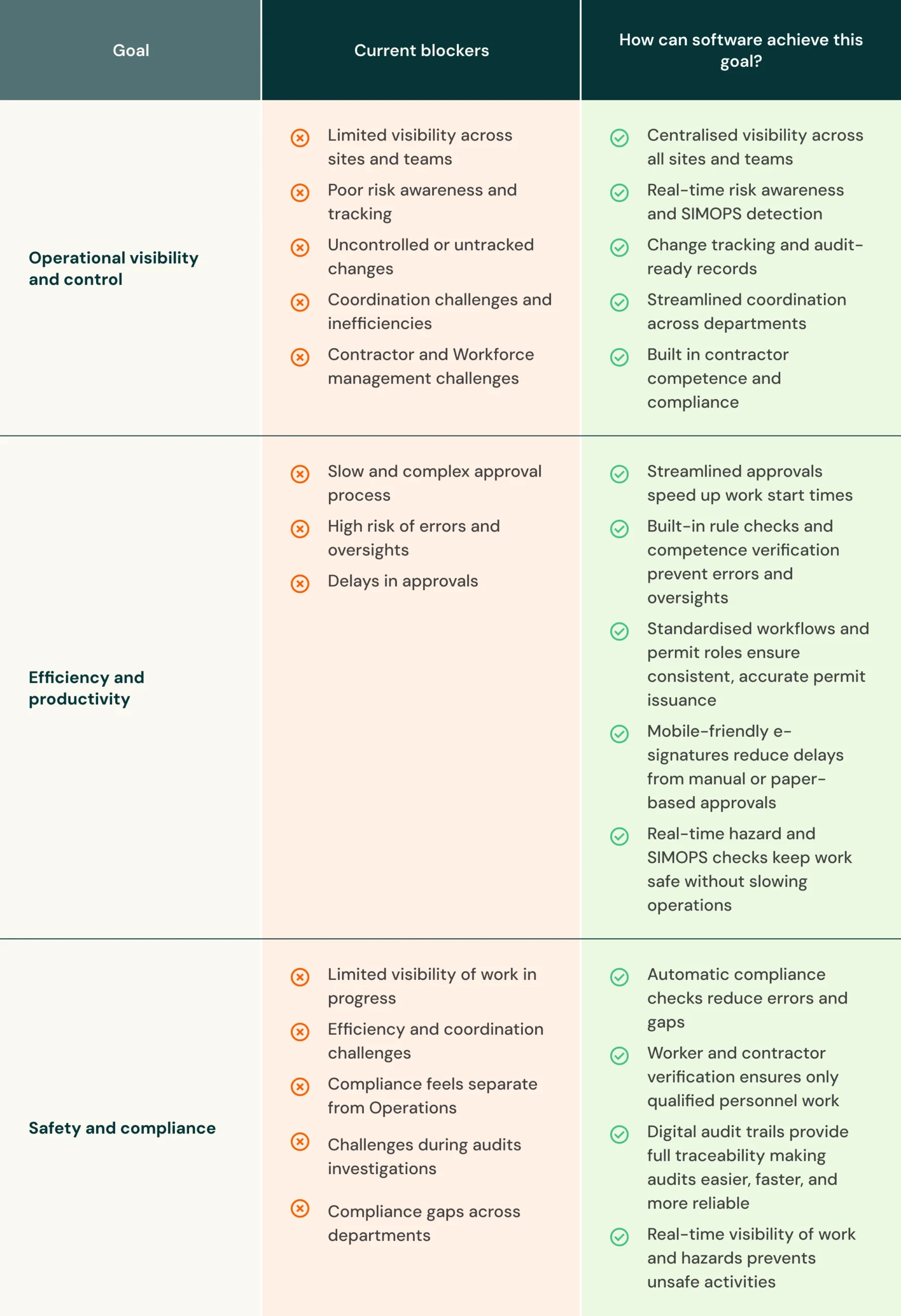
Use this table to articulate the drawbacks of your current manual system, and how your chosen solution supports business goals.

Table Drawbacks Of Manual System

Quantifying ROI: Calculating the value of Permit to Work software

This is one of the most important sections of your business case. The issue of costs will be what the identified decision makers primarily focus on, and you need to be prepared to answer all their requests. It’s also a good idea to put significant research into the projected ROI of the project.

Note: This section of the business case will likely be the most research-intensive, do not forget to reach out other departments for assistance in gathering accurate financial data.

What you will need to include:

Total cost of current permit management process

Outline the direct and indirect costs of your current system. Calculate time lost due to delays in issuing and handing over permits. Calculate the time spent sourcing documentation both internally and from contractors. Record the amount of time and admin required to prepare for audits. Lost time incident rates (LTIR) and approval cycle duration could also be useful metrics here.

Total implementation cost 

This figure will encompass the cost of both the software purchase and implementation:

It can be made up of:

  • Number and type of licences you need to purchase
  • Contract type 
  • Cost of onboarding 
  • Data migration costs (if moving from one system to another)
  • Cost of employee training 
  • New hardware purchases 
  • Any system customisation 

Projected savings 

This is where you will include information on the potential savings of your chosen solution.

It can be made up of:

  • Savings accumulated over 1-3 years
  • Payback period 
  • Relevant financial benefits (e.g., reduction in insurance premiums)
  • Potential reduction in liabilities and fines
  • Project ROI 

Calculating your ROI

The ROI of your project can be calculated using the following formula:

Writing tip: Using graphs and charts can make your financial data more engaging for readers.

What your stakeholders care about (and how to speak their language)

Part of your business case will involve identifying and communicating with your stakeholders. For the purposes of this business case, we will be looking at decision makers and software users.

Decision Makers Image

Decision makers

This group includes members of the C-Suite (department managers, senior managers, directors). The can cross departments such as procurement, finance, and IT.

What will decision makers be looking for?

  • Typically, this will be price and how the software will positively influence revenue and reduce operational costs while also safeguarding legal compliance obligations.
  • They will also want to understand other aspects such as longevity of the software, scalability, and how implementation will work across the business and supply chains.

To influence decision-makers, you should talk in terms of technology as a direct investment into the safety of employees, increased operational efficiencies, and ongoing compliance with relevant regulations.

The language you use here is important. Here are some ways to frame operational metrics into financial language:

Software Users Image

Software users

This group includes any employee or contractor that will be using the software on a day-to-day basis.

What will software users be looking for?

  • Ease of use will be a prime motivator for this group. There are likely to be users who are moving to a software solution for the first time, so this will need to be considered. The user interface (UI) of the solution will be an important factor, as software that is perceived as difficult to navigate will face adoption issues.
  • They should be made aware of onboarding, training, and support options that will be made available to them.
  • Survey the software users’ group as to their main concerns on using software for permit management and gain their input for software requirements.

Success stories: CBRE Citibank

Jade Quotes

CBRE is the world’s largest commercial real estate services and investment firm. Managing buildings of the size and scale of Citibank’s is a challenge. There are typically between 20 and 30 different planned works on site, performed by a range of different contractors.

With the team spending huge amounts of time manually managing the permit process and resolving issues, there was a clear need for change.

With ePermits, it no longer takes Jak 2-3 hours a day to manage permits. Now, it is as little as 10 minutes. Contractor permit applications that used to take half an hour are now completed in a matter of minutes.

Want to see the full story? Click the link below.

Building your business case: step-by-step checklist

Here is a step-by-step rundown for building your business case:

Introduction/ executive summary – This section should provide an overview of the problem being faced and the proposed solution. It’s a good idea to leave this until the others are completed.

Background information – Explain why the project needs to take place. You can include relevant research insights here, either internal or third party.

Project stakeholders – List all the relevant stakeholders in this project, not just members of the project or safety team.

Project objectives – Explain why the project is taking place, and what problem you expect to solve with your chosen solution.

Business requirements – Show that you have incorporated any business requirements that the organisation may have, for example if there are security limitations on software that can be purchased.

Vendor evaluation – Here is where you present the software vendors that you have considered.

Benefits of your chosen solution – Detail why the chosen solution was selected.

Risk assessment of the project – Include a risk analysis of the project as well as what would happen if it does not go ahead.

Cost analysis and ROI – Show that you have undergone a thorough investigation of the project’s costs.

Implementation timeline – Provide an implementation plan with dates. Your chosen vendor should be able to assist you with this section. Include major milestones like go-live dates and training programmes.

Authorisations – Who will sign off on the project and at what stage.

Writing tip: Decide on the best delivery option for your business case. Will you rely on a multi-page document or utilise a presentation?

Managing Permits with EcoOnline

EcoOnline’s ePermits is a fully configurable solution that reduces human error to near zero through automated workflows, which can check for clashes and other potential issues and alert you to take preventative action.

It also provides full control of contractors and workers by facilitating checks in/out through the Access permit process, such as training, induction, and competency checks.